


Planet #1024 - my JS1K entry
 So, the JS1K contest is closed for submissions. The goal was to create something cool in just 1024 bytes (or less) and there have been lots and lots of entries, some of them pretty damn cool. I just had time to submit something before the deadline - a planet generator featuring random zooming, rotating planets, complete with cloud system, shading, atmospheric glow and a star filled background. Check it out here.
Should work in current versions of Firefox, Opera, Chrome and Safari.
Read more...
 So, the JS1K contest is closed for submissions. The goal was to create something cool in just 1024 bytes (or less) and there have been lots and lots of entries, some of them pretty damn cool. I just had time to submit something before the deadline - a planet generator featuring random zooming, rotating planets, complete with cloud system, shading, atmospheric glow and a star filled background. Check it out here.
Should work in current versions of Firefox, Opera, Chrome and Safari.
Read more...
Strange attractors - beautiful chaos and canvas
 Math has the ability to both be totally awesome and beautiful as well as make me bang my head into the wall. While the actual math involved at times goes way above my head, some things are just so damn elegant and when, on top of that, they can be visualized with pretty pictures, I'm sold. To make things even better, we have <canvas> and with it the ability to throw some JavaScript at this
 magic math.
Links to gallery and generator at the bottom if you want to skip the details.
I'm sorry if I offend any math-enabled people with this post, I am but a mere mortal so bear with me if I mess up any of the math.
Anyway, fractals like the well-known Mandelbrot set (and many others) have that ability as do another category of mathematical creatures known as strange attractors. So what are they? I asked Wikipedia: While in every day use, one might think of an attractor as something that attracts stuff, in this context it's really the pattern or the result of what's going on in a system. E.g. if you're measuring and graphing the relationship between a number of variables over time, by connecting those points you could refer to the resulting pattern as an attractor.
A point attractor a simple form of attractor. Consider a pendulum. Release it and it will always, eventually, end up at rest in the same place. That resulting pattern (the point) would be the attractor for that system.
What about strange attractors, then? Chaos, alright. Among other things, that involves being very sensitive to initial conditions (butterfly -> wing-flapping -> tornado, etc). It's more complex that than, but that's where it just goes beyond what I can grok.
Ok, so what we need is a function that, when called over and over again, shows unpredictable and radically different behaviour if we change some initial conditions (even just slightly). Fortunately there are smart people who already found such functions.
One of those is the quadratic map given by
xn+1 = a0 + a1 xn + a2 xn2 + a3 xn yn + a4 yn + a5 yn2,
yn+1 = b0 + b1 xn + b2 xn2 + b3 xn yn + b4 yn + b5 yn2
where a0-a5 and b0-b5 are constants that make up that attractor. Another is the Peter de Jong attractor using trigonometric functions:
xn+1 = sin(a yn) - cos(b xn),
yn+1 = sin(a xn) - cos(b yn)
I've only played around with a few but there are many more. These, however, produce some very interesting visuals.
 One problem, at least in the case of the quadratic attractor, is that, if the a0-a5 and b0-b5 factors are chosen randomly, very few (like 1% for quadratic, the other formulas seem to have a higher rate of success) combinations produce a useful chaotic system. Determining which ones do is done using something called the Lyapunov exponent, which I won't go into but look it up if you're interested.
All this was heavily inspired by the work done by Paul Bourke who has done all sorts of awesome math visualization. The code itself is also partly based on a program available on Bourke's site.
View the gallery for pretty pictures or make your own using the generator. The way it works is that you pick a formula/attractor type and click "Generate". It then searches for potentially nice images by selecting random values for the ai and bi coefficients. When a chaotic attractor is found, it draws it on the screen, optionally with some pretty and colorful compositing (courtesy of Pixastic). You can recreate any attractor by using its seed number (displayed after the name). If you find some really nice ones, leave a comment with the seed and attractor type so I and others can see.
Also, If you're going to generate your own images, I really suggest using Chrome (or WebKit, although it has problems with the compositing). Any recent canvas enabled browser should work, though.
View the gallery
Try the generator
Read more...
Math has the ability to both be totally awesome and beautiful as well as make me bang my head into the wall. While the actual math involved at times goes way above my head, some things are just so damn elegant and when, on top of that, they can be visualized with pretty pictures, I'm sold. To make things even better, we have <canvas> and with it the ability to throw some JavaScript at this I'm sorry if I offend any math-enabled people with this post, I am but a mere mortal so bear with me if I mess up any of the math.
Anyway, fractals like the well-known Mandelbrot set (and many others) have that ability as do another category of mathematical creatures known as strange attractors. So what are they? I asked Wikipedia:
"An attractor is a set to which a dynamical system evolves after a long enough time."
While in every day use, one might think of an attractor as something that attracts stuff, in this context it's really the pattern or the result of what's going on in a system. E.g. if you're measuring and graphing the relationship between a number of variables over time, by connecting those points you could refer to the resulting pattern as an attractor.
A point attractor a simple form of attractor. Consider a pendulum. Release it and it will always, eventually, end up at rest in the same place. That resulting pattern (the point) would be the attractor for that system.
What about strange attractors, then?
"An attractor is informally described as strange if it has non-integer dimension or if the dynamics on it are chaotic."
Chaos, alright. Among other things, that involves being very sensitive to initial conditions (butterfly -> wing-flapping -> tornado, etc). It's more complex that than, but that's where it just goes beyond what I can grok.
Ok, so what we need is a function that, when called over and over again, shows unpredictable and radically different behaviour if we change some initial conditions (even just slightly). Fortunately there are smart people who already found such functions.
One of those is the quadratic map given by
xn+1 = a0 + a1 xn + a2 xn2 + a3 xn yn + a4 yn + a5 yn2,
yn+1 = b0 + b1 xn + b2 xn2 + b3 xn yn + b4 yn + b5 yn2
where a0-a5 and b0-b5 are constants that make up that attractor. Another is the Peter de Jong attractor using trigonometric functions:
xn+1 = sin(a yn) - cos(b xn),
yn+1 = sin(a xn) - cos(b yn)
I've only played around with a few but there are many more. These, however, produce some very interesting visuals.
One problem, at least in the case of the quadratic attractor, is that, if the a0-a5 and b0-b5 factors are chosen randomly, very few (like 1% for quadratic, the other formulas seem to have a higher rate of success) combinations produce a useful chaotic system. Determining which ones do is done using something called the Lyapunov exponent, which I won't go into but look it up if you're interested.
All this was heavily inspired by the work done by Paul Bourke who has done all sorts of awesome math visualization. The code itself is also partly based on a program available on Bourke's site.
View the gallery for pretty pictures or make your own using the generator. The way it works is that you pick a formula/attractor type and click "Generate". It then searches for potentially nice images by selecting random values for the ai and bi coefficients. When a chaotic attractor is found, it draws it on the screen, optionally with some pretty and colorful compositing (courtesy of Pixastic). You can recreate any attractor by using its seed number (displayed after the name). If you find some really nice ones, leave a comment with the seed and attractor type so I and others can see.
Also, If you're going to generate your own images, I really suggest using Chrome (or WebKit, although it has problems with the compositing). Any recent canvas enabled browser should work, though.
View the gallery
Try the generator
Read more...
Pocket Full of Canvas
 One thing I found interesting when I did the JuicyDrop music visualization was MilkDrop's deformation effects. Rather than processing deformations for each and every pixel it works on a grid of points and then just interpolates the results for the actual pixels. I sort of mimicked that in JuicyDrop but in a simpler way. The grids used in JuicyDrop are something like 5x5 to 9x9 where MilkDrop uses much higher resolution grids and instead of doing per-pixel interpolation, the grid points are used to cut out triangles from the previous frame and paint them on the new frame, slightly transformed.
 Since the deformations are usually very small when seen on a frame-by-frame basis, you can get some pretty good results even with fairly low resolution grids, and most recent browsers are more than capable of rendering 100 or even more triangles on a canvas. In the end, I was pleasantly surprised at how well everything turned out since I wasn't even sure I was going to get anything remotely close to what the original MilkDrop plugin produced.
 While I still plan on doing some more work on JuicydDrop eventually, I decided to rip out just the grid deformation part and built something new around it. You see, every now and then I get the urge to just throw something quick together and make some flashing light or dancing balls or whatever but usually that urge comes when I only have 30 minutes to spare. So I figured I'd try to build a mini framework for making stupid demo effects and stuff like that.
 I've ended up with a small application that loads simple scripts, exposes a bunch of functions to these scripts and then takes care of rendering and processing whatever the script tells it to. It's probably best explained by just taking a look at it. The whole idea was to make it as easy as possible for me to just throw some silly effect together real quick and hopefully not write too much code in the process, so it might not be the most thought through design but it gets the job done. The functions available range from basic drawing and image processing (via Pixastic) to audio data and 3D (via Pre3D).
 There's no larger goal with this and there are already more robust and more elaborate frameworks out there for programming and animating graphics with JavaScript/Canvas(Processing.js for instance) so this is just my own little time-sink. You're of course welcome to play around with it, modify the existing scripts or even make your own.
To wrap things up, I made a little a demo comprised of scripts I cooked up while testing and developing this thing (as well as a few adaptations of other people's work). I totally recommend using Chrome and if possible, the dev channel as it's given me by far the best performance and visual appearance.
Watch the demo here
Play around with the application here
Read more...
One thing I found interesting when I did the JuicyDrop music visualization was MilkDrop's deformation effects. Rather than processing deformations for each and every pixel it works on a grid of points and then just interpolates the results for the actual pixels. I sort of mimicked that in JuicyDrop but in a simpler way. The grids used in JuicyDrop are something like 5x5 to 9x9 where MilkDrop uses much higher resolution grids and instead of doing per-pixel interpolation, the grid points are used to cut out triangles from the previous frame and paint them on the new frame, slightly transformed.
Since the deformations are usually very small when seen on a frame-by-frame basis, you can get some pretty good results even with fairly low resolution grids, and most recent browsers are more than capable of rendering 100 or even more triangles on a canvas. In the end, I was pleasantly surprised at how well everything turned out since I wasn't even sure I was going to get anything remotely close to what the original MilkDrop plugin produced.
While I still plan on doing some more work on JuicydDrop eventually, I decided to rip out just the grid deformation part and built something new around it. You see, every now and then I get the urge to just throw something quick together and make some flashing light or dancing balls or whatever but usually that urge comes when I only have 30 minutes to spare. So I figured I'd try to build a mini framework for making stupid demo effects and stuff like that.
I've ended up with a small application that loads simple scripts, exposes a bunch of functions to these scripts and then takes care of rendering and processing whatever the script tells it to. It's probably best explained by just taking a look at it. The whole idea was to make it as easy as possible for me to just throw some silly effect together real quick and hopefully not write too much code in the process, so it might not be the most thought through design but it gets the job done. The functions available range from basic drawing and image processing (via Pixastic) to audio data and 3D (via Pre3D).
There's no larger goal with this and there are already more robust and more elaborate frameworks out there for programming and animating graphics with JavaScript/Canvas(Processing.js for instance) so this is just my own little time-sink. You're of course welcome to play around with it, modify the existing scripts or even make your own.
To wrap things up, I made a little a demo comprised of scripts I cooked up while testing and developing this thing (as well as a few adaptations of other people's work). I totally recommend using Chrome and if possible, the dev channel as it's given me by far the best performance and visual appearance.
Watch the demo here
Play around with the application here
Getting your ASCII on with Flickr


A while back I made a JavaScript image-to-ASCII-art converter using the image data access available through the Canvas element. For this Thursday's afternoon of fun and code, I decided to pull it back out of the closet and see what else I could do with it.
I'd already worked a bit with the Flickr API and found it quite a pleasant experience, so I decided to make a small application that pulls out Flickr photos and asciifies them for retro fun and profit.
 You can choose to have the characters colored the same color as the pixels they represent or simply leave them black/white. Optionally, you can have the background of the character colored as well by choosing "use blocks", making the final image more akin to a very blocky or pixelated version of the original, just made out of HTML rather than an actual image. Last, there's the option of having the background of the output be the average color of the original image. This may not look great for all images - and of course makes no sense if you're already using the blocks method.
Be aware that far from all Flickr images are suitable for Asciifying and some of the options just mentioned look better on some images than on others.
By default, the application will only ask for images that are licensed under the Creative Commons licenses to ensure that no feelings and/or intellectual property rights are hurt.
Since the application relies on the Canvas element and image data access, so far only Firefox, Opera and recent WebKit nightlies are supported.
Click here to start Asciifying Flickr
..or read on, if you're interested in
The image is then painted (and downscaled since we're not using all pixels) on a hidden Canvas element, the image data is retrieved using getImageData() and each pixel in the image is analyzed. The brightness of the pixel is calculated using a simple RGB to brightness formula and this level of brightness is then mapped to a list of characters selected for their varying apparent brightness. The list used here is [ .,:;i1tfLCG08@] for black/white output and [ CGO08@] for colored output.
If the output is black/white, we just write the character to a string and move on to the next. If we're using colored output, we create a span element styled with the appropriate color. All these spans are the reason it can appear a bit more sluggish when using colors than when using black/white output. If the "blocks" option is on, we simply set the background of the character span to be the same color as the character itself. This way, the block appears solid but we can still drag the mouse over the output and select the ASCII text. For the last option, background color, the original image is downscaled to a 1x1 pixel Canvas and the color of this single pixel is read and used as the background color of the containing element.
Feel free to leave a comment or ask any questions.
Get Asciified!
Read more...
A while back I made a JavaScript image-to-ASCII-art converter using the image data access available through the Canvas element. For this Thursday's afternoon of fun and code, I decided to pull it back out of the closet and see what else I could do with it.
I'd already worked a bit with the Flickr API and found it quite a pleasant experience, so I decided to make a small application that pulls out Flickr photos and asciifies them for retro fun and profit.
How it works
You simply enter the search query of your choice and click the "Asciify" button. A request is then sent off to the Flickr server and any photos that match the query are returned. The image data is analyzed and turned into ASCII characters.
You can choose to have the characters colored the same color as the pixels they represent or simply leave them black/white. Optionally, you can have the background of the character colored as well by choosing "use blocks", making the final image more akin to a very blocky or pixelated version of the original, just made out of HTML rather than an actual image. Last, there's the option of having the background of the output be the average color of the original image. This may not look great for all images - and of course makes no sense if you're already using the blocks method.Be aware that far from all Flickr images are suitable for Asciifying and some of the options just mentioned look better on some images than on others.
By default, the application will only ask for images that are licensed under the Creative Commons licenses to ensure that no feelings and/or intellectual property rights are hurt.
Since the application relies on the Canvas element and image data access, so far only Firefox, Opera and recent WebKit nightlies are supported.
Click here to start Asciifying Flickr
..or read on, if you're interested in
How it really works
The Flickr search part is pretty straight forward. A single request is sent, calling the "flickr.photos.search" method. We then get a list of photos from Flickr, but we can't access the data in these directly due to the same-origin policy of the Canvas element. To get around this, we're using a small proxy script (written in PHP) that does nothing other than retrieve the image file and pass it straight through to the browser.The image is then painted (and downscaled since we're not using all pixels) on a hidden Canvas element, the image data is retrieved using getImageData() and each pixel in the image is analyzed. The brightness of the pixel is calculated using a simple RGB to brightness formula and this level of brightness is then mapped to a list of characters selected for their varying apparent brightness. The list used here is [ .,:;i1tfLCG08@] for black/white output and [ CGO08@] for colored output.
If the output is black/white, we just write the character to a string and move on to the next. If we're using colored output, we create a span element styled with the appropriate color. All these spans are the reason it can appear a bit more sluggish when using colors than when using black/white output. If the "blocks" option is on, we simply set the background of the character span to be the same color as the character itself. This way, the block appears solid but we can still drag the mouse over the output and select the ASCII text. For the last option, background color, the original image is downscaled to a 1x1 pixel Canvas and the color of this single pixel is read and used as the background color of the containing element.
Feel free to leave a comment or ask any questions.
Get Asciified!
Read more...
23 pretty JavaScript fractals
 The previous post about the size optimized Mandelbrot renderers didn't really do the Mandelbrot set justice in terms of mathematical and aesthetical prettiness. So, armed with my two good friends, Canvas and JavaScript, I set out to further explore the infinite beauty and complexity of both the Mandelbrot set and other fractals.
The result is a small application that lets you view visualizations (colored or b/w) of different fractals and zoom in by simply clicking the mouse. There are a few different fractals available:
The controls should be fairly self-explanatory, but here they are anyway:
Note that changing some of the settings causes an immediate re-render of the image.
Be warned that the further you zoom in on any of the fractals, the more CPU time is needed to render, and of course a large image size is more demanding than a small one. I've found Safari with latest WebKit nightly to be the fastest but YMMV. Firefox 3 seems to have memory issues when you zoom in more than a few times and there is of course no IE support.
And for the finish, here are a few images from a zoomed-in Mandelbrot set.


Play with JavaScript fractals here Read more...
The previous post about the size optimized Mandelbrot renderers didn't really do the Mandelbrot set justice in terms of mathematical and aesthetical prettiness. So, armed with my two good friends, Canvas and JavaScript, I set out to further explore the infinite beauty and complexity of both the Mandelbrot set and other fractals.
The result is a small application that lets you view visualizations (colored or b/w) of different fractals and zoom in by simply clicking the mouse. There are a few different fractals available:
 Mandelbrot set - The granddaddy of all fractals, the work of super smart mathemagician Benoît Mandelbrot. This one shouldn't need much introduction. Also available are a few Multibrots, variations on the Mandelbrot theme created by raising z to higher powers, rather than the standard z^2 of the Mandelbrot.
 Tricorn - Another variation of the Mandelbrot set, also sometimes called the Mandelbar.
- Burning Ship - Another famous fractal, named after the neat structures that appear when zooming in along the x-axis on the positive side. This is the one depicted at the very beginning of this post.
- Julia set - Created much like the Mandelbrot set, but using a constant complex number C. Depending on the complex number used, this will render in any number of different ways. A selection of numbers are available. Dendrite, Siegel Disk, Douady's Rabbit and San Marco are all also variations of the Julia set.
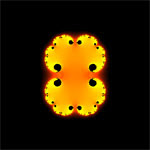

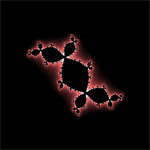
- Julia Cubed - A variation of the Julia set, using z^3 instead of z^2. Much like the Multibrot variations of the Mandelbrot set.

- Julia Sine/Cosine - More variations of the Julia set, now using trigonometric functions to create interesting structures. Note that these are a bit slower than the rest due to the many extra function calls.

The controls should be fairly self-explanatory, but here they are anyway:
- Image size: The dimensions of the rendered image. Smaller = faster.
- Color scheme: The color used when painting the fractal. Black/white might be a bit faster.
- Smooth colors: A prettier but slower coloring algorithm. The image may look darker when using smooth colors. Only works well for Mandelbrot and Julia set (using z^2) and causes banding when zooming in.
- Zoom factor: How much to zoom in when clicking.
Note that changing some of the settings causes an immediate re-render of the image.
Be warned that the further you zoom in on any of the fractals, the more CPU time is needed to render, and of course a large image size is more demanding than a small one. I've found Safari with latest WebKit nightly to be the fastest but YMMV. Firefox 3 seems to have memory issues when you zoom in more than a few times and there is of course no IE support.
And for the finish, here are a few images from a zoomed-in Mandelbrot set.
Play with JavaScript fractals here Read more...
